You clicked 'Pay' on your Indian Visa Fee payment, your bank sent the deduction notification, and then — nothing. No confirmation email, no success page, no application reference. Just a deducted amount and a blank screen or the status saying pending on the Indian Visa portal. What will you do?

Applicants around the globe from Taiwan, USA, Austria, Switzerland, Singapore and other eligible countries for an India e-visa might face this issue.
Before you reapply or pay again, read this. It's a known technical issue, it's covered by official guidance, and there's a clear process to follow.
Why Such Issue Appears?
The India e-Visa fee payment status update may take up to 2 hours due to technical reasons or network delays.
What typically causes this: your payment went through on the bank's end, but the return signal to the Indian e-Visa portal was dropped — usually due to a connectivity interruption or browser timeout at the moment of redirect. The money left your account. The portal didn't receive the confirmation.
This does not mean your application failed. It means the two systems didn't connect the payment transaction.
The Two Payment Gateways | What They Are and How to Choose?
Before understanding why payment confirmation fails, it helps to understand the two systems handling the transaction.
The official India e-Visa portal processes payments through two separate gateways, presented as options at checkout:
SBIePay:
Operated by the State Bank of India. Handles Visa and Mastercard credit and debit card transactions. Uses SSL (Secure Sockets Layer) encryption and supports 3DSecure, Verified by Visa and Mastercard Secure Code, wherever applicable. This is the default gateway presented on the payment page.
Axis Bank:
A private sector gateway that also handles card payments, with a separate helpline for international callers.
PayPal:
A third option alongside both gateways, presented on the SBIePay payment page after you're redirected from the application. PayPal processes the transaction through its own system rather than directly through either bank gateway.
A practical note on gateway selection: The two gateways behave differently across international card issuers, and this is one of the reasons confirmation failures happen. The two gateways behave very differently with international banks. As a general pattern confirmed by applicants across nationalities: European cardholders tend to have better success with Axis Bank; American cardholders tend to have better results with SBIePay. Neither pattern is universal, but if one gateway fails or produces no confirmation, trying the other on a subsequent attempt (after the 25-minute wait) is a legitimate troubleshooting step.
American Express cards are not accepted on either gateway. Both payment methods do not accept American Express. If you're using an Amex card and payment isn't going through, the card itself is the issue, switching to a Visa or Mastercard, or using PayPal, is the only fix.
How the transaction flows: You complete the application form, click 'Pay Now,' and are redirected to the SBIePay payment page where you choose between card entry or PayPal. You enter your details and click Proceed. At this point your bank sends the deduction. The SBIePay or Axis Bank system then sends a confirmation signal back to the India e-Visa portal. If that return signal is interrupted by a browser timeout, a network drop, a slow bank reconciliation, the portal doesn't register the payment even though your bank already processed it. The money left your account. The portal didn't receive the news. That's the specific technical gap this blog addresses.
Step 1 | Wait Before Doing Anything
The e-Visa fee payment status update may take up to 2 hours due to technical reasons or network delays. Before re-applying, applicants are requested to wait for 2 hours after final submission.
In practice, international card transactions and bank-side reconciliation can occasionally take longer — some applicants see their status update within 24–48 hours. If nothing has resolved after 2 hours, use the 'Verify Payment' tool (Step 2 below) and check again the following morning before taking further action. Do not reapply or pay again during this window.
One More Thing — Check Your Spam Folder
Before concluding that no confirmation was sent, check your spam and junk folders. Immediately after you submit your e-Visa application and make the payment, you will receive a confirmation of submission of your application on the email ID provided while filling up your application form. Confirmation emails from the portal are occasionally filtered by email providers. If it's there, your application was received successfully.
Step 2 | Use the Official "Verify Payment" Tool
Once two hours have passed, go to India Visa Website portal and click 'Verify Payment / Pay e-Visa Fee'. Enter your application ID and check the payment status directly.
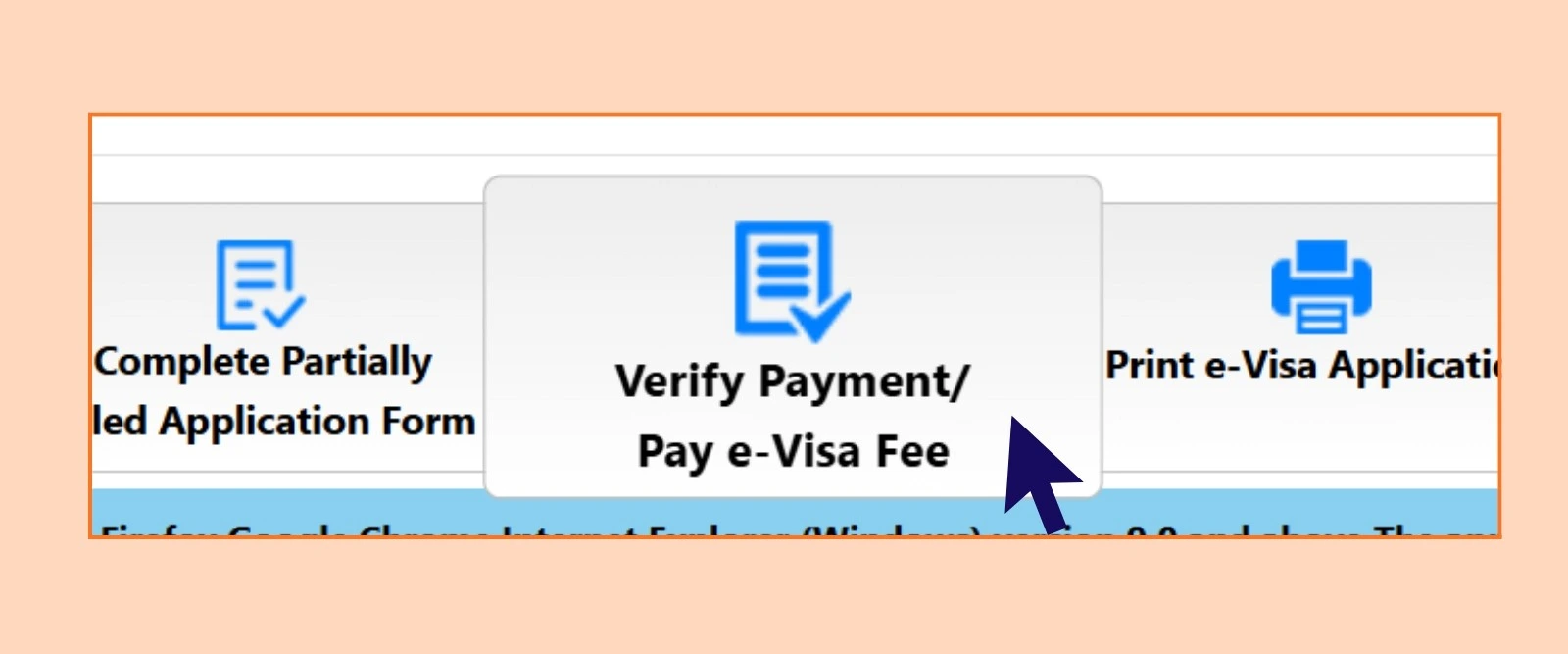
In cases where the India e-Visa fee has been deducted but status is not updated, applicants are advised to verify their payment status by clicking on the 'Verify Payment / Pay Visa Fee' tab or by clicking on the Verify Payment link.
Understanding What the Portal Status Terms Actually Mean:
While you're waiting and checking, the portal may show different status messages that aren't self-explanatory. Here's what each one means in this specific payment-confirmation scenario:
- "Under Process" / "Under Review": Your application has been received and is being processed. If your payment went through and you're seeing this, your application is in the system — the confirmation email may simply be delayed.
- "Pending": Payment may still be reconciling between the bank and the portal. Do not retry. Check again after the 2-hour window.
- "Not Saved": The application wasn't successfully submitted before payment was attempted, or the session timed out. In this case, the charge may still have been attempted — check your bank statement and use the Verify Payment tool.
- "Failed": The payment transaction has been confirmed as unsuccessful. You can retry (see Step 3). Any amount deducted against a failed transaction will be refunded within 7 days.
Do not submit a new application while any of these statuses other than "Failed" are showing. A duplicate application on the same passport number creates additional complications that are harder to resolve than the original payment issue.
This is the official tool for this exact situation. Use it before taking any further action.
Step 3 | If Status Shows Failed, You Can Try Again
If the transaction status is showing 'failed', the customer may attempt another transaction. The debited amount shall be refunded to the applicant's card account after the reconciliation process within seven (7) days of the transaction.
Two important rules if you retry:
- Wait at least 25 minutes between payment attempts on the same application ID.
- If the payment page itself isn't loading or keeps failing, clear your browser history and cookies first, or switch to a different browser entirely — the official guidance recommends deleting browser history and cookies before trying to make payment, and changing the browser if the problem persists.
Step 4 | If the Problem Persists, Contact the Payment Helpdesk
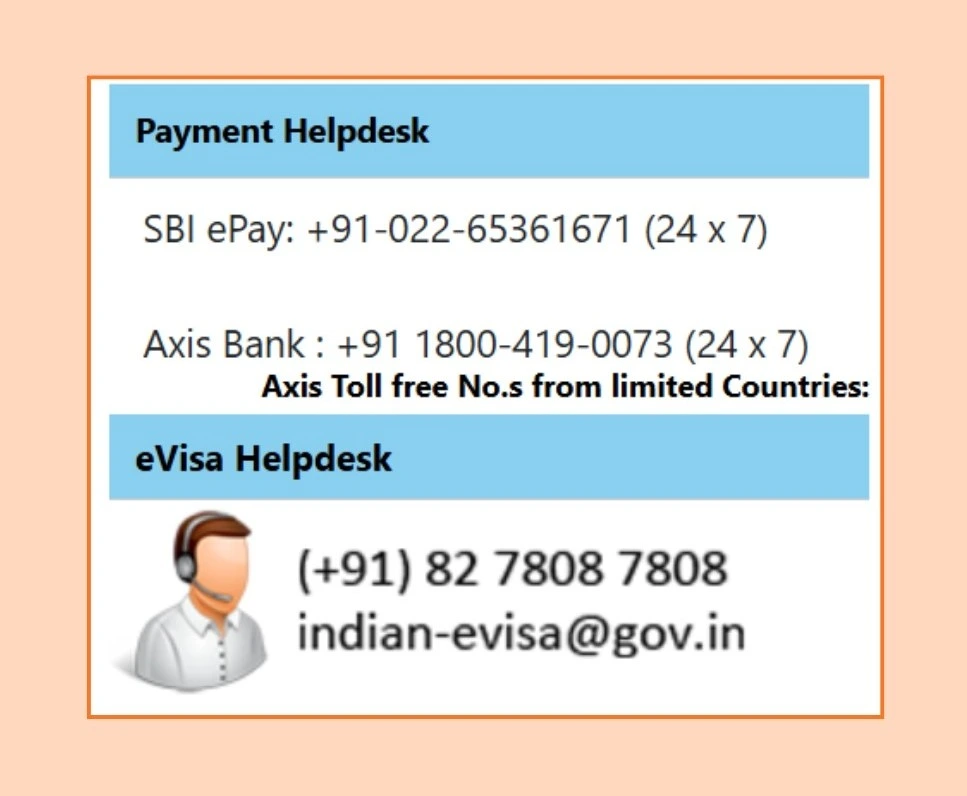
If you've waited, verified, and still can't resolve it, contact the payment processors directly. Both operate 24/7:
SBI ePay — handles Visa and MasterCard transactions:
- Phone: +91-022-65361671 (24x7)
Axis Bank — handles all card payments and gateway issues:
- Toll-free helpline: +91 1800-419-0073 (24x7)
For visa-related queries (not payment), contact the official India e-Visa helpdesk:
- Email: indian-evisa[at]gov[dot]in
- Phone: (+91) 82 7808 7808 or +91 11 24300666
What About the Refund?
An applicant shall be charged only once for any successful transaction against an application ID. Any further debits shall be refunded back to the customer after due reconciliation, within seven days of the transaction.
If you were charged twice — either by retrying too quickly or due to a system error — the duplicate charge will be refunded within 7 days. You don't need to raise a dispute with your bank immediately; give the reconciliation process time to complete. If nothing arrives after 7 days, contact SBI ePay or Axis Bank with your transaction reference number.
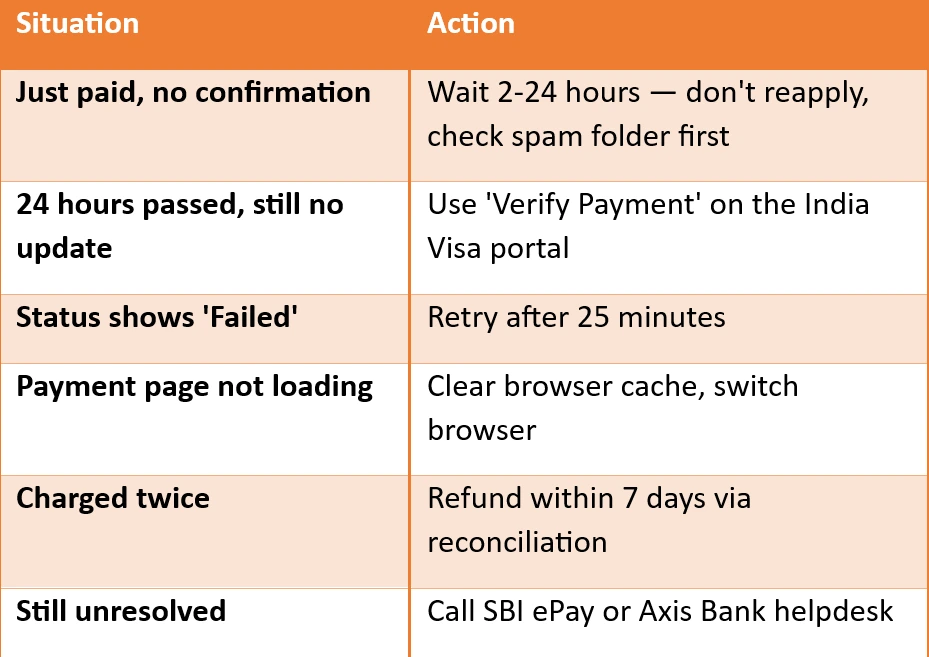
Quick Check— What to Do?
At IVC Visas, we handle the application process on your behalf — including navigating payment issues, re-upload requests, and status tracking, so you're not troubleshooting a government portal at midnight before a flight. If you'd like a smoother application experience from the start.
Learn how to apply with IVC Visas and still, if you face any queries, feel free to contact IVC 24x7.
Disclaimer: IVC Visas is an independent visa service provider. We assist with application preparation and submission to official government portals. Final visa approval decisions are made solely by Indian immigration authorities. All information is based on current regulations as prescribed by the Government of India, which may change. Always verify the latest requirements before travel.