Most people preparing for an India e-Tourist Visa application think about documents once — when filling in the form. What they miss is that the document requirements split into two separate moments: what you upload to the portal before your trip, and what you carry to the airport and Indian immigration on the day. Getting the first step right gets your India visa approved. Getting the second right gets you on the plane and through immigration without issue.

Let's go through every document, exact specification, and what to watch out for.
What to Upload on the India e-Tourist Visa Portal?
The official Indian e-Visa portal requires the following for an e-Tourist Visa application. Whether you are a citizen of Australia, Sweden, Indonesia or from 175 eligible nationalities, have everything ready before opening the form — the application takes 10–15 minutes and stopping mid-way to find a document is where errors happen.
Document 1 | Passport Bio Page Scan
Your passport's bio page is the page showing your photograph, full name, date of birth, nationality, passport number, and expiry date.
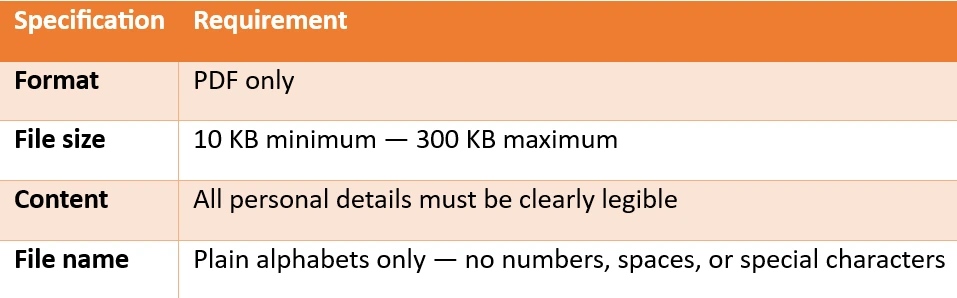
What the portal checks: Format and file size only.
What manual review checks: Whether every detail is actually readable. A scan that passes the upload check and fails manual review because it's blurry, dark, or cropped incorrectly is one of the most common causes of India e-Visa rejection.
Scan in colour, high contrast, with all four corners of the page clearly visible. Do not upload a visa page, an old passport, or a photo of your passport taken on a phone screen.
Learn through IVC Visas about common mistakes that lead to India Visa rejection.
Document 2 | Passport Photograph
Your photograph is uploaded separately from your passport scan and is subject to strict specifications that the upload check only partially enforces.
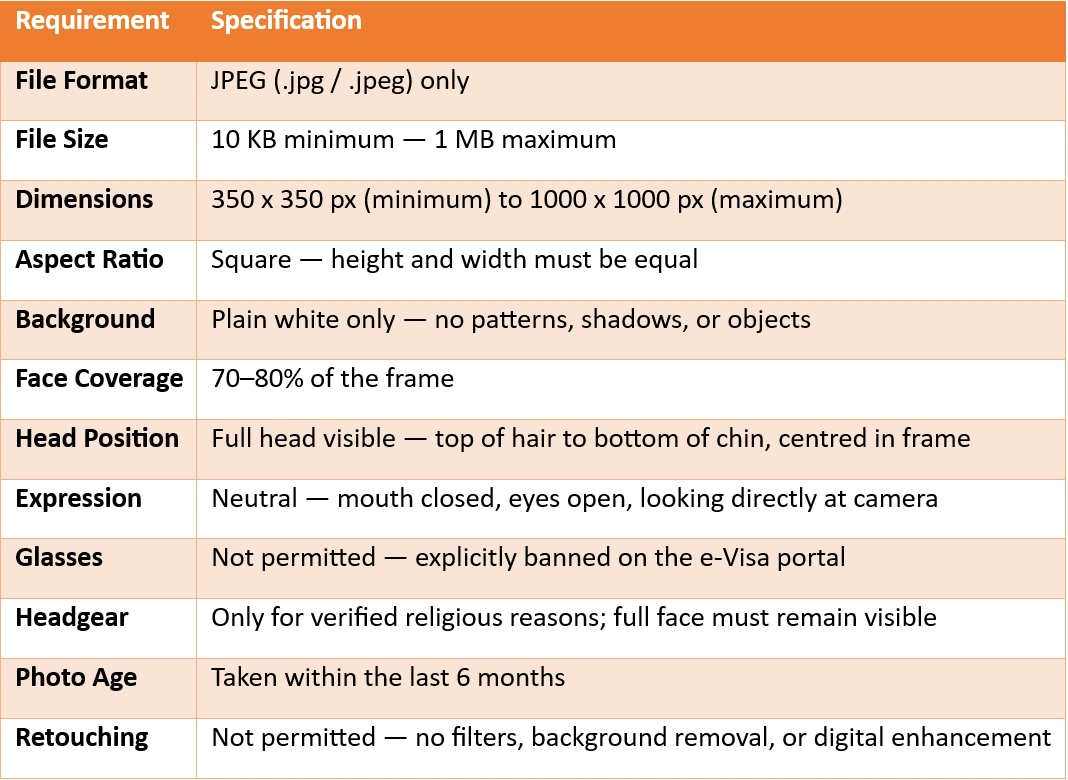
What the portal checks: Format, file size, and basic dimensions.
What manual review checks: Background color, shadows, glasses, expression, face coverage, and whether the photo appears recent. A photo that passes the upload check can still fail manual review — and the fee is non-refundable when it does.
Document 3 | Course or Voluntary Work Letter (If Applicable)
For most tourists — sightseeing, visiting friends or family, general travel — no additional document is required beyond the passport scan and photograph.
Two exceptions apply under the India e-Tourist Visa:
- Short-term courses (language, music, dance, cooking, arts and crafts, medicine — not exceeding 6 months and not issuing a formal certificate or diploma): upload a letter from the institute or organization on official letterhead.
- Voluntary work of short duration (maximum one month, no monetary payment of any kind): upload a letter from the organization concerned on official letterhead.
Both letters must be in PDF format, 10 KB–300 KB, and in English. Non-English documents are liable for rejection regardless of content.
What Else You Need to Complete the Application?
These are not documents to upload — but they are required to submit and complete your India e-Tourist Visa application:
Valid email address: Your approved ETA is delivered here. All official communications — including re-upload requests and status updates — go to this address. Double-check your email before submitting. A typo means your India visa goes nowhere, and the fee is already gone.
Payment card: A credit or debit card is accepted. A bank transaction charge of 3% applies additionally to the applicable India e-Visa fee. The fee is non-refundable once submitted — regardless of whether the application is granted or rejected. Check the current India e-Tourist Visa fee before applying.
What to Carry to the Airport and Indian Immigration?
A granted India e-Tourist Visa does not mean your job is done. Immigration officers at Indian airports verify several documents on arrival, and airlines may check some of these before boarding. Prepare this second checklist before you leave for the airport.
✔ Printed ETA
Your Electronic Travel Authorization must be printed and carried physically. Do not rely on a digital copy alone. Before you travel, confirm your status reads 'GRANTED' on the official Indian e-Visa portal — never travel on a pending status. You can also track your India visa application status through IVC Visas.
✔ The Same Passport Used to Apply
You must travel on the exact passport used when applying for your India e-Tourist Visa. If you have renewed your passport since applying, carry both old and new passports — immigration will need to see the old one with the ETA against it.
✔ Return or Onward Journey Ticket
The official Indian e-Visa eligibility conditions state that international travellers must have a return ticket or onward journey ticket. Airlines can request this at check-in, and immigration officers can ask for it on arrival. Have it accessible — printed or clearly available on your device.
✔ Proof of Accommodation
A hotel booking confirmation, a letter of invitation from a host in India, or a confirmed address for your stay. Immigration officers may ask where you're staying, particularly on a first visit.
✔ Proof of Sufficient Funds
You must have sufficient money to support yourself during your stay. A bank statement, forex card, or cash is acceptable. There is no specified minimum amount — the standard applied is whether you can demonstrably support the duration of your visit.
✔ Completed e-Arrival Card
All international travellers entering India must complete a digital e-Arrival Card within 72 hours before arrival — via the official portal at indianvisaonline.gov.in or through the Indian Visa Su-Swagatam mobile app. This must be done before you board, not at the airport on arrival. It is separate from your India visa and is mandatory.
✔ Yellow Fever Vaccination Certificate (If Applicable)
If you have departed from or transited through a Yellow Fever endemic country within 6 days of your India arrival, you must carry a valid Yellow Fever vaccination certificate in original. Failure to produce it may result in mandatory quarantine of up to 6 days on arrival.
✔ Previous Passport (If Applicable)
If your passport was renewed after your India e-Tourist Visa was issued, carry your previous passport alongside your new one. Immigration will need to verify the ETA against the passport it was issued on.
Do You Need Travel Insurance for an India e-Tourist Visa?
No, travel insurance is not a mandatory requirement for the India e-Tourist Visa. Neither the India e-Visa portal nor Indian immigration authorities require proof of insurance to approve an application or to clear immigration on arrival, and it isn't listed among the eligibility conditions for the e-Tourist category.
That said, it's worth carrying anyway, for reasons that have nothing to do with visa approval:
- Medical costs in India are paid out of pocket at the point of care for foreign nationals without local coverage, and private hospital treatment can be expensive without a policy behind it.
- Trip cancellation, delayed baggage, and emergency evacuation are the kinds of costs a standard travel policy covers and a visa approval says nothing about.
- Some connecting flights or layover countries on the way to India may have their own insurance requirements, separate from India's, worth checking based on your specific routing.
If you already hold a policy for other reasons, it costs nothing to add it to your travel folder alongside your ETA and other documents. If you don't, it's a personal risk decision rather than a visa requirement, since it has no bearing on whether your application gets approved.
What NOT to Upload?
These are the upload errors that cause India e-Tourist Visa applications to stall or get rejected:
❎ Uploading a visa page instead of the bio page: The bio page is the one with your photo and personal details, not the pages with stamps
❎ Uploading HEIC, PNG, or WebP instead of JPEG/JPG: The portal accepts JPEG/JPG only for photographs. Simply renaming a file doesn't convert it — use a proper image converter
❎ Uploading a digitally altered photo: Background removal, skin smoothing, or any editing is not permitted. The photo must be a natural, unmodified image taken against a real white background
❎ Non-English supporting documents: All letters and supporting files must be in English, regardless of your nationality or where the document was issued
❎ File names with numbers, spaces, or special characters: Rename files to plain alphabets before uploading (e.g. "passportscan.pdf" not "passport_scan 2026 (1).pdf")
❎ Blurry or low-contrast passport scan: Meets the size requirement, fails human review.
❎ Photo taken more than 6 months ago: The portal won't detect this; a reviewer will.
Get It Right the First Time!
Every document above has an exact specification. At IVC Visas, our team reviews your passport scan, photograph, and supporting documents against every official specification before your India e-Tourist Visa application reaches the portal. Format, size, legibility, photo compliance, file naming, we check all of it. Because a pre-submission review costs far less than a rejected application and a second non-refundable fee.
Why IVC visas should be travelers' preference?
- Expert human review of every application
- Document compliance checks to avoid technical errors
- 24/7 support via chat, email, and WhatsApp
- Expedited processing options for urgent travel
- Transparent pricing with no hidden fees
- Post-approval support until you arrive in India
An expert review is necessary if you are applying for an Indian eVisa because sometimes document errors can cost your application.
Questions about your specific documents? Contact our team before applying.
Apply stress-free with IVC Visas!
Disclaimer: IVC Visas is an independent visa service provider. We assist with application preparation and submission to official government portals. Final visa approval decisions are made solely by Indian immigration authorities. All information is based on current regulations as prescribed by the Government of India, which may change. Always verify the latest requirements before travel.