Most people spend hours filling out their India e-visa application — double-checking passport numbers, travel dates, entry ports — and then upload the first decent photo they can find. A recent passport photo from their wallet. A cropped selfie. Something that looks fine.
And then their application gets flagged.
Photo-related rejections and delays are one of the most common and most preventable reasons where India visa applications hit a wall. The frustrating part? The portal doesn't always tell you exactly what's exactly is wrong. It either rejects the upload outright, or your application moves into review and quietly stalls while officials flag the image on their end.
The good news: every single photo requirement is published and knowable in advance.
IVC visas lays it all out — the exact specifications, the rules people routinely miss, how to take a compliant photo at home, and what to do if your photo has already been rejected.
Why Your Photo Can Make or Break Your India Visa Application

The Indian government's e-Visa portal runs an automated check on your photo the moment you try to upload it. It scans for file format, file size, dimensions, and basic composition. If it fails that check, it won't even let you proceed.
But here's what catches people off guard — passing the automated upload check doesn't mean you're clear. Immigration officials manually review photos during processing too. A photo that technically uploaded fine can still trigger a delay or rejection if it doesn't meet the visual requirements: wrong background, shadows on the face, glasses causing glare, or an image that's clearly more than six months old.
Your photo is also used to verify your identity on arrival. Immigration officers at Indian airports compare your face against the photo on your application. A poor, blurry, or outdated image isn't just a bureaucratic inconvenience but a genuine entry risk.
The standard is higher than most people expect. Here's exactly what it requires.
The Exact Photo Specifications
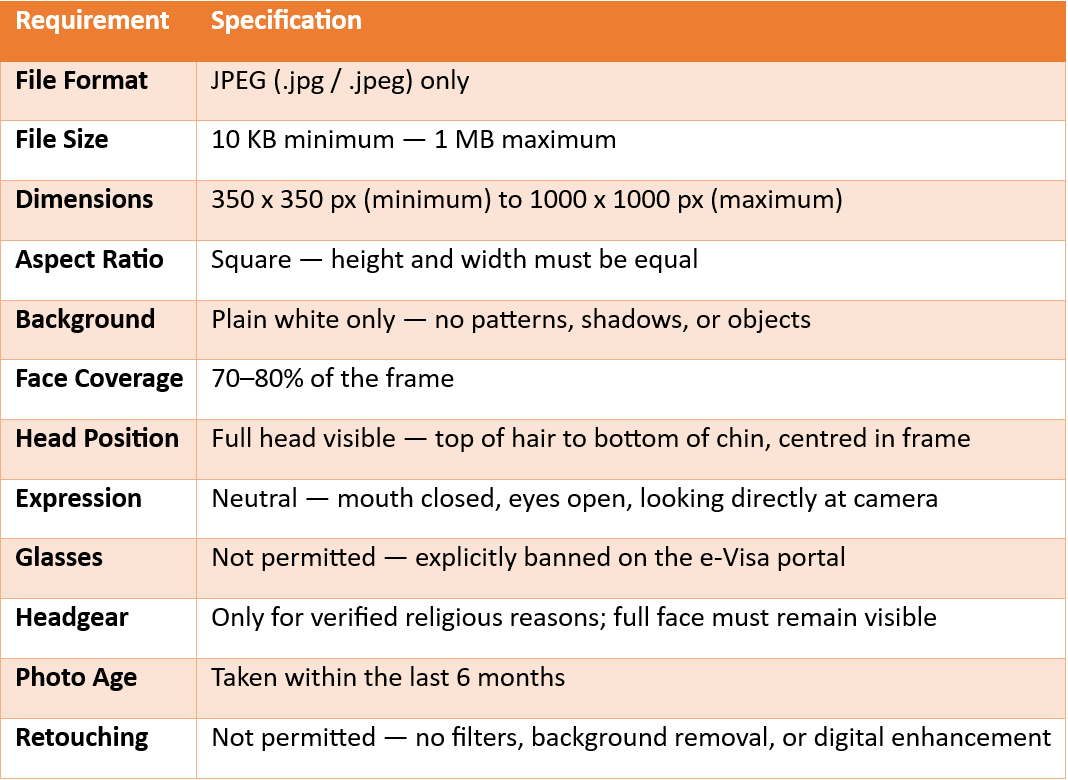
If you wear glasses every day, take them off for the photo. It takes thirty seconds and eliminates one of the most avoidable rejection triggers on the entire application.
10 Reasons India e-Visa Photos Get Rejected
Here are the most common culprits, drawn from official requirements and consistent patterns in real applicant experiences:
1. Wrong file format
The e-Visa portal only accepts genuine JPEG files. This is trickier than it sounds. Opening a PNG or HEIC in your photo app and selecting "Save As JPEG" doesn't always produce a true JPEG — the file extension changes but the underlying format may not convert correctly. Use a dedicated image converter, or take the original photo on a device that captures natively in JPEG.
2. File size out of range
The portal's window is 10 KB to 1 MB. Photos from modern smartphones can be several megabytes — too large to upload. Compress before uploading. At the other end, images under 10 KB are too low in resolution and will also be rejected.
3. Non-white background
Off-white, cream, light grey — none of these pass. The background must be plain white. Textured walls, curtains, furniture edges peeking into frame, or any object in the background including a chair back will cause rejection.
4. Shadows on the face or background
Shadows are one of the trickier problems to catch before uploading. Standing too close to the wall creates a shadow behind the head. A single overhead light source casts shadows under the nose and chin. Slightly uneven room lighting can produce subtle shadows that still get flagged. Even, front-facing light is essential.
5. Taking a selfie
Selfies produce a characteristic distortion, the face appears too large relative to the frame, the angle is off, and the arm holding the phone is sometimes visible at the edge. The portal's automated check can detect unusual proportions. Ask someone else to take the photo.
6. Smiling or showing teeth
Any expression that noticeably changes the shape of your face — a broad smile, raised eyebrows, a wide grimace — is grounds for rejection. The requirement is a neutral expression with the mouth closed. A calm, natural look is fine; anything that exposes teeth or pulls the face out of its resting shape is not.
7. Hair covering the face
Hair falling across the eyes, eyebrows, or significant portions of the face blocks the facial features that immigration officials need to clearly see. Tie hair back or tuck it behind the ears before the photo. Fringes that partially obscure the forehead are a frequent and easily fixable issue.
8. Wearing white clothing
Light-colored or white tops disappear against the mandatory white background, making it hard to distinguish the edges of the face and shoulders. Wear clothing that contrasts clearly — dark or medium tones work well. Busy patterns and logos are also best avoided.
9. Glasses
As covered above, glasses are explicitly not permitted for e-Visa applications. Even clear, thin-framed prescription glasses are grounds for rejection regardless of whether they cause glare.
10. Photo older than six months
If your appearance has changed noticeably — hairstyle, facial hair, significant weight change — a photo from more than six months ago may not pass review. The six-month rule exists because immigration officers cross-check your face on arrival against the photo on your application. Use something current.
How to Fix and Re-Upload Your Photo
If the portal rejected your photo during upload:
This is the simpler scenario. The system shows an error and you can upload a corrected version before submitting your application. Fix the specific issue — resize, properly convert, reshoot, or relight — and try again.
If your application has already been submitted:
The official portal may send you an email asking you to re-upload a corrected image. Monitor your registered email closely, including spam folders. If you receive this request, respond promptly — according to official guidance, if corrected information isn't provided within 72 hours, the application may be rejected.
If the portal keeps rejecting despite the photo looking correct:
This is a known frustration, particularly around format conversion. Work through the following:
- Use an actual JPEG converter.
- Clear your browser cache and cookies before attempting to reupload.
- Try a different browser — the portal behaves inconsistently across Chrome, Firefox, and Safari.
- Ensure the image is genuinely square before uploading. Non-square images often fail even when the pixel count looks correct.
- Save the image name without symbols.
If you applied through IVC Visas, our team checks your photo against all specifications before your application reaches the portal so issues like format errors, size problems, or background issues are caught before they cause a delay.
How to Take a Compliant Photo at Home
You don't need a studio. The vast majority of compliant India e-Visa photos are taken at home with a smartphone — provided you approach it properly.
- Setting up: Stand or sit roughly two feet away from a plain white wall. Don't press yourself against it — the gap between you and the wall is what prevents background shadows. Position yourself facing a window or natural light source directly in front of you. This creates even, balanced front lighting that eliminates shadows on the face. Avoid setups where the only light source is overhead or off to one side.
- Taking the photo: Ask someone else to take it — no selfies. Hold the phone at eye level, not angled up or down. Keep your head straight and centred in the frame. Look directly into the camera lens with a neutral expression — mouth closed, both eyes fully open. Take several shots and pick the sharpest, most evenly lit result.
- What to wear: Avoid white or very light tops — they blend into the background. Skip busy patterns or large logos. Dress the way you normally would when travelling — the photo should accurately represent your current appearance. Take off your glasses before the shot.
- Before uploading: Confirm the file is a genuine JPEG. Check the file size is between 10 KB and 1 MB. Verify the image is square and your face takes up roughly 70–80% of the frame.
The same specifications apply regardless of where you're based — whether you're a US citizen, UK national, Australian passport holder, or any other eligible nationality applying for an e-Tourist Visa or e-Business Visa. The Indian government's photo standard is consistent across all nationalities.
Quick Checklist — Before You Upload
Run through this before hitting submit:
✔️ File is a genuine JPEG — not just renamed from PNG or HEIC
✔️ File size is between 10 KB and 1 MB
✔️ Image is square — height and width are equal
✔️ Background is plain white with no shadows or objects
✔️ Face takes up 70–80% of the frame
✔️ Full head visible — top of hair to bottom of chin
✔️ Eyes open and clearly visible
✔️ No glasses whatsoever
✔️ Neutral expression, mouth closed
✔️ No hat or headgear (unless religious, with full face visible)
✔️ Hair is not covering eyes, eyebrows, or ears
✔️ Not wearing white clothing
✔️ Photo taken within the last 6 months
✔️ No filters, retouching, or digital editing of any kind
If you want to double-check you're applying for the right visa type or make sure you meet all the other requirements beyond the photo, the eligibility requirements and common mistakes are worth a read before you begin.
Looking for an Indian visa expert who could deal with this issue?
At IVC Visas, we review your photo and documents before your application ever reaches the government portal so issues like wrong file formats, size problems, or background errors are caught before they cause a rejection or delay.
With 24/7 support via Chat, WhatsApp, and Email, and experience helping travellers from over 175 nationalities apply for India e-Visas, we make sure your application goes in right the first time.
Disclaimer: IVC Consulting Services Pte Ltd does not represent the Government of India or any government department, nor is it affiliated with or tied to any Embassy or Authority. IVC is a private consulting agency that provides professional visa-related services and charges a consulting fee. The grant or rejection of any visa is solely at the discretion of the respective Embassy or Immigration Authority.